Read: 29 - Room
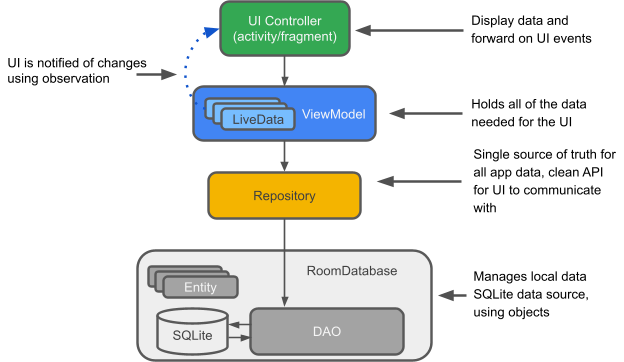
Overview: Saving data with Room
Room is a persistence library, part of the Android Architecture Components. It makes it easier to work with SQLiteDatabase objects in your app, decreasing the amount of boilerplate code and verifying SQL queries at compile time.
Save data in a local database using Room
- Room persistence library provides an abstraction layer over SQLite to allow fluent database access while harnessing the full power of SQLite.
- Room provides the following benefits - compile-time verification of SQL queries, convenience annotations that minimize repetitive and error-prone boilerplate code, and streamlined database migration paths.
- Setup - add these depencies: dependencies { def room_version = “2.2.6”
implementation “androidx.room:room-runtime:$room_version” annotationProcessor “androidx.room:room-compiler:$room_version”
// optional - RxJava2 support for Room implementation “androidx.room:room-rxjava2:$room_version”
// optional - RxJava3 support for Room implementation “androidx.room:room-rxjava3:$room_version”
// optional - Guava support for Room, including Optional and ListenableFuture implementation “androidx.room:room-guava:$room_version”
// optional - Test helpers testImplementation “androidx.room:room-testing:$room_version” }
- Primary components:
- The database class that holds the database and serves as the main access point for the underlying connection to your app’s persisted data.
- Data entities that represent tables in your app’s database.
- Data access objects (DAOs) that provide methods that your app can use to query, update, insert, and delete data in the database.
- AppDatabase defines the database configuration and serves as the app’s main access point to the persisted data. The database class must satisfy the following conditions:
- The class must be annotated with a @Database annotation that includes an entities array that lists all of the data entities associated with the database.
- The class must be an abstract class that extends RoomDatabase.
- For each DAO class that is associated with the database, the database class must define an abstract method that has zero arguments and returns an instance of the DAO class.
Defining entities in Room
Defining data using Room entities
- When you use the Room persistence library to store your app’s data, you define entities to represent the objects that you want to store. Each entity corresponds to a table in the associated Room database, and each instance of an entity represents a row of data in the corresponding table.
- Anatomy of an entity
- Each Room entity can be defined as a class that is annotated with @Entity. A Room entity includes fields for each column in the corresponding table in the database, including one or more columns that comprise the primary key.
- Room uses the class name as the database table name.
- Define a primary key
- Each Room entity must define a primary key that uniquely identifies each row in the corresponding database table. The most straightforward way of doing this is to annotate a single column with @PrimaryKey.
- If you need instances of an entity to be uniquely identified by a combination of multiple columns, you can define a composite primary key by listing those columns in the primaryKeys property of @Entity.
- Ignore fields
- If an entity has fields that you don’t want to persist, you can annotate them using @Ignore, and can use ignoredColumns for an entity inherits fields from a parent entity.
- Provide table search support
- Room supports several types of annotations that make it easier for you to search for details in your database’s tables.
- Support full-text search - add the @Fts3 or @Fts4 annotation to a given entity
- Index specific columns - to add indices to an entity, include the indices property within the @Entity annotation, listing the names of the columns that you want to include in the index or composite index.
- Include AutoValue-based objects
- In Room 2.1.0 and higher, use Java-based immutable value classes, which you annotate using @AutoValue, as entities in your app’s database. This support is particularly helpful when two instances of an entity are considered to be equal if their columns contain identical values.
- With @AutoValue as entities, you can annotate the class’s abstract methods using @PrimaryKey, @ColumnInfo, @Embedded, and @Relation. When using these annotations, however,include the @CopyAnnotations annotation each time so that Room can interpret the methods’ auto-generated implementations properly.
Related entities in Room
Define relationships between objects
- SQLite is a relational database, so you can specify relationships between entities.
- Create embedded objects
- @Embedded annotation - represents an object that you’d like to decompose into its subfields within a table. You can then query the embedded fields just as you would for other individual columns.
- prefix property - f an entity has multiple embedded fields of the same type, you can keep each column unique by setting this property.
- One-to-one relationship - between two entities is a relationship where each instance of the parent entity corresponds to exactly one instance of the child entity, and vice-versa.
- In order to query the list of users and corresponding libraries, first model the one-to-one relationship between the two entities. Create a new data class where each instance holds an instance of the parent entity and the corresponding instance of the child entity.
- @Transaction annotation - ensure that the whole operation is performed atomically.
- One-to-many relationship between two entities is a relationship where each instance of the parent entity corresponds to zero or more instances of the child entity, but each instance of the child entity can only correspond to exactly one instance of the parent entity.
- Many-to-many relationship between two entities is a relationship where each instance of the parent entity corresponds to zero or more instances of the child entity, and vice-versa.
- Nested relationships - if you might need to query a set of three or more tables that are all related to each other.
Accessing data with Room
Accessing data using Room DAOs
- Data access objects(DOA) - Each DAO includes methods that offer abstract access to your app’s database. At compile time, Room automatically generates implementations of the DAOs that you define.
- Can define each DAO as either an interface or an abstract class.
- Annotate your DAOs with @Dao
- Convenience methods - that let you insert, update, and delete rows in your database without writing any SQL code.
- Query methods - that let you write your own SQL query to interact with the database.
- @Insert annotation - allows you to define methods that insert their parameters into the appropriate table in the database.
- @Update annotation - allows you to define methods that update specific rows in a database table.
- @Delete annotation - allows you to define methods that delete specific rows from a database table.
- @Query annotation - allows you to write SQL statements and expose them as DAO methods.
- DAOs can return PagingSource objects for use with Paging 3.
- Can write your DAO methods to return a Cursor object.